
Explore a world of 3D design and printing.
This is a family-friendly review of the AOSEED X-Maker Joy AI 3D Printer. It is both my and my children’s (8 and 15) first experience of owning and using a 3D printer.
BUT WHAT CAN KIDS ACTUALLY DO WITH A 3D PRINTER?
Are you hesitant about having a 3D printer in the house? I was, mainly due to a lack of understanding about just how much you can do with one, an assumption that they were too expensive, or the feeling that you need to be tech-savvy to get started. But after testing out the AOSEED X-Maker Joy AI 3D Printer, I realise just how much it has to offer, especially for families.
3D printing is a brilliant way to encourage practical creativity, problem-solving and hands-on STEM learning. The X-Maker Joy is best suited to smaller creations having a 120 × 120 × 120mm build area, ideal for first creative projects. Children can make toys such as figurines (great for mini hobbyists), moving models, and fidgets. It is also a fun way to create useful, personalised gifts for friends and family, like keyrings. The possibilities are HUGE.

WHAT AGE IS THIS SUITABLE FOR?
For first-time creators starting their 3D journey, X-Maker Joy offers something for all ages (recommended age 4-12). It is a great way for parents and children to explore new technology together, rather than everyone disappearing onto separate screens.
Younger children can choose designs from a library of ready-to-print models and learning projects, then customise them using guided creative tools to adjust characters, colours, etc., with adult supervision. Older children, like my teen, as they gain confidence, can explore more advanced modelling through digital design and AI-powered tools to create original models.
It is about inspiring creativity as much as it is about exploring technology.

Introducing the AOSEED X-Maker Joy AI 3D Printer.
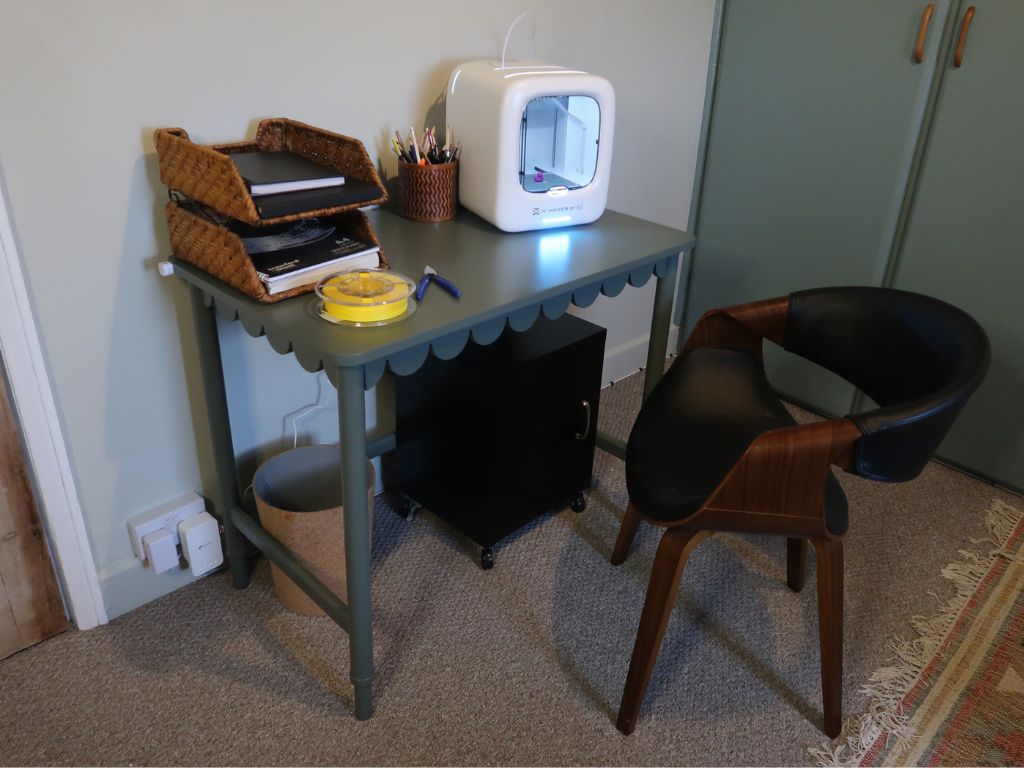
Founded in 2011, AOSEED is a specialist in creative technology for children. Designed with children and families in mind, the user- friendly AOSEED X-Maker Joy AI is a compact, fully enclosed mini 3D printer that combines creative technology, AI-powered design and hands-on play in one exciting package. I really like the X-Maker Joy’s aesthetic – a simple white cube shell with clear acrylic viewing door. For any photosensitive or neurodivergent families with sensory sensitivities, I note that the X-MAKER Joy has an LED indicator light on the front of the printer at the bottom. It changes colour to show the printer status.
Measuring approximately 29 × 31 × 27 cm and weighing 4.05 kg, the X-Maker Joy AI is compact enough to fit on a desk.
The 3D printer is controlled primarily via a FREE (no pay-to-play here!) smart app (available on iOS, Android, Windows) which offers intuitive software with one-click printing, voice/drawing AI prompts, and a library of 12,000+ pre-programmed toys and models. We downloaded it on a phone to test.

WHAT’S IN THE BOX?
- X-MAKER JOY 3D Printer ×1
- 4 coloured PLA filament Spools (and Spool Holder)
- Magnetic Base/Build Plate ×1
- DIY Stickers to decorate the printer. COOL FACT: The printer has holes where you can use the app to make accessories for the printer (like Pikachu ears).
- Tool Pliers
- Power adapter
- Paper Quick-start guide and Warranty card

Easy to set up and beginner-friendly
What I liked, as a rather nervous first-time user, is the plug-and-play design. The printer arrives pre-assembled and pre-calibrated, helping to make the first steps straightforward. Unpack, and on top of the unit you will find a QR code that will take you through a brief unboxing video, explaining the items in the box and what/where everything is on the printer, which I found so useful. It also has a QR code for the app, which you download for setup. Plug in the printer, then the app takes you through set-up with images, and you follow the high-speed Wi-Fi pairing in the app. You then physically load the filament (3-5minutes) watch the setup video instructions, or just use the picture steps in the app. Once loaded it takes a few more minutes (2-3) for the nozzle to heat up, and I watched this progress in the app. I think setting up my normal HP ink printer was more complicated. You can print immediately from the app, which allows children to select a design and start printing with minimal fuss.

Family-friendly design and safety
The compact, fully enclosed design helps keep little hands away from moving parts, while rounded edges help reduce the risk of pinching. The door just closes onto clips. (I think magnets would be better suited to avoid heavy-handed pulling and risking the plastic hinges breaking). The printer has a built-in HD camera for monitoring progress and recording time-lapse videos of creations taking shape. You can toggle this on or off in the app, and it’s a great feature that my children love, as they can view the build progress even if they are not in the printer room. The magnetic build plate makes finished creations easier to remove. Carefully lift it out to cool at room temperature, and we used a plastic spatula (or dental floss) to remove the finished item. As with all 3D printers, adult supervision is still important, particularly around hot components and when changing filament.

With a reported noise level of less than 45 dB, it is designed to print quietly enough to be more comfortable in a family home. When the printer is plugged in and turned on, the sound is like a laptop fan. And during active printing, the only extra sound is the print head moving around. If it’s printing in the spare room and I am in the hall, you can’t hear anything.
Aside from replacing filaments, when necessary, minimal physical intervention is required during the printing process, thanks to the printer’s integrated print management features. The auto-levelling platform (ensures that the first layer sticks properly) removes the need for manual levelling, while the quick-release nozzle can be changed without tools. There is also filament runout detection, which pauses printing when it needs replacing. All of this makes the X-Maker Joy very user-friendly.

Speed and Precision
The X-Maker Joy prints up to 400 mm/s (with peak performance reaching 500–600 mm/s) at an accuracy up to 0.05 mm. The printer is designed for fast, detailed printing. I can’t compare the speed with other 3D printers, but tech reviews speak highly of the X-Maker Joy alongside other family-oriented models. I will say, from a mum perspective, explain to children beforehand the reality of print time. For our first project with the children, we chose a small single-part duck which took 15 minutes, so the kids could could watch and enjoy the magic of it forming in front of their eyes. Larger toys and small figures with movable parts etc will be more like 10 hours to print, so it’s worth explaining that some creations take patience!

App and Digital Content
The X-MAKER app is simple to use, and teens can navigate solo. It is essentially a creative platform and has 5 tabs in the menu. There is a basic profile page where you view your coins and favourites, the Create design space where you can import STL files and access 7 downloadable AI smart features, such as AI Doodle, where you upload a picture and turn it into a 3D model. Generating designs in this section requires coins. You are given a number to start, but others are purchased. A Toy section with a picture/video library of more than 12,000 ready-to-print designs, updated weekly, providing plenty of inspiration. You click on your choice, view the dimensions, and click again, which shows the printing time and filament amount required. For builds that need post print assembly steps are shown here. One more click and the printer is active. TADA! The Printer tab shows the real time camera view and options to load and unload the filament. Explore has its own tabs – Guide with videos, Creator courses and Models. AOSEED emphasizes Mini Design Modules are included in its app and there are purchasable kits you can buy to elevate the experience i.e. turn a printed car into a radio-controlled toy!
You can also search for ideas, and I started with featured, then fidgets because the range of choice could be a bit overwhelming. The only thing I would like to see is the ability to sort the builds into print times – shorter to longer.
Voice-command support adds another layer of convenience, while compatibility with standard STL, OBJ and GCode files allows more experienced users to explore third-party design software.

Filaments (think of them like material ink cartridges).
The printer uses filament to build objects layer by layer. PLA (polylactic acid) is the recommended material for beginners and is included with the product. Additional PLA can be purchased separately. This printer supports single-colour printing only so you will need to manually change the filament if you want a multi-colour toy. Different filament colours can be loaded for different projects, and the quick-release nozzle makes changing filament easier.
For our second build Norah chose a yellow fiddler so we unloaded and reloaded different colour filament – which took only 5 minutes, and she then selected and actioned printing through the app herself confidently. I thought she may get bored as it was a five hour print, but she stayed watching through the viewing door for ten minutes and returned through the day or viewed on the phone the progress. When the toy was complete she was so proud and has asked to do another immediately this morning so for an 8 year old this is a really exciting item to have and she wants to make each of her friends a model! And we have not even branches out into the design features yet which I think will be best accessed through downloading the app on a tablet.

Verdict: Strong family-oriented design and a brilliant gift for budding creators!
The AOSEED X-Maker Joy AI 3D Printer is a frankly rather mind-blowing Christmas gift for children who enjoy designing, building and experimenting. With its beginner-friendly set-up, enclosed design, creative app and extensive library of printable models, it offers the ideal introduction to 3D printing and STEM learning. Although it’s a more substantial investment than a typical toy (available from £215.99 with free shipping and a one-year warranty), there are literally thousands of possibilities to explore for children (and grown-ups) of all ages and I was surprised how 3D printers have become significantly more affordable, making the technology increasingly accessible to everyday households.

AD We were gifted the AOSEED X-Maker Joy AI 3D Printer to include in our Christmas Gift Guide. The opinions expressed in the review are our own.
